BEPRO Space
BEPRO Editor
Cerberus
Login & Signup
Request Match Analysis
0
BEPRO Space
Basic
All Users
What is Library?
Let's learn about library
The library is a space where you can archive videos and files. You can also share materials by designating team members as collaborators for specific folders.
Let's briefly look at the basic structure of the library page.
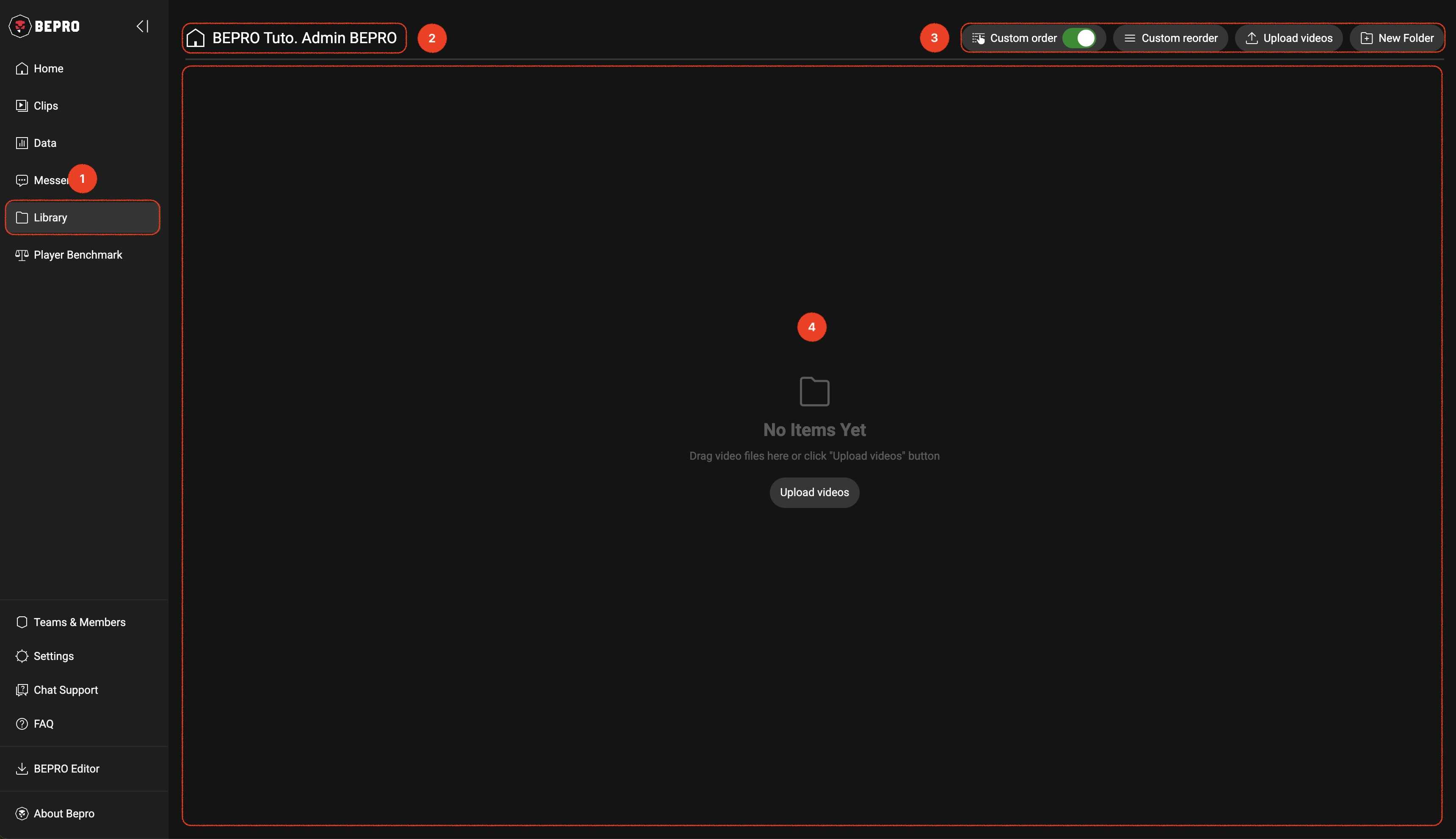
1. Accessing the Library Page
You can access the Library page by selecting the Library menu from the sidebar.
2. Current Folder Name
The name of the current page appears in the upper left corner of the Library page.
If you're in the top-level folder, your name will appear, and if you double-click to enter a subfolder, the name of that folder will appear along with a back button.
3. Action Button Group
In the upper right corner, there are menus such as Custom Order, Upload Video, and New Folder.
Custom Order
Library items are basically in table list form and consist of 5 columns: name, video length, creation date, owner, and item type.
You can sort items in ascending/descending order based on each column, but you use this when you want to arrange items in a specific order that you prefer.
Upload Video
You can save videos to the library while viewing them in the BEPRO space, but you can also upload videos directly.However, if you are a Viewer in the team and the team administrator restricts permissions, the upload button may not appear.
4. Library Item Area
Both folders and video items are listed here.
Previous